
Last Wednesday I had the pleasure of presenting at the East Anglia SharePoint user group (SUGUK). The user group is organised by Randy Perkins and Peter Baddeley who are both very friendly, knowledgeable SharePoint guys. Whilst my session aimed to provide some general guidance on SharePoint administration (I’m presenting a similar deck at SharePoint Saturday), the subject of this blog is a topic covered during the evenings first session: “SharePoint 2010 Virtualisation“, presented by John Timney (MVP). To be more specific, this post discusses NUMA node boundaries in the context of virtualising SharePoint and hopefully raises some questions around whether the MS documentation should perhaps be updated to include guidance for larger multi-core processors (i.e. more than 4 cores).
| Disclaimer I feel the need to add a disclaimer at this stage as I am by no means an expert when it comes to NUMA architecture or hardware in general. I do think however that my findings should be shared as the guidance from Microsoft almost certainly has a real impact on hardware purchasing decisions at a time when virtualising SharePoint is an industry hot topic (as perhaps evidenced by the great user group turnout). Use this guidance at your own risk – seek the advice of your hardware vendor. |
|---|
What is NUMA, and why should I care?
Let’s start with a definition from Wikipedia:
“Non-Uniform Memory Access (NUMA) is a computer memory design used in Multiprocessing, where the memory access time depends on the memory location relative to a processor. Under NUMA, a processor can access its own local memory faster than non-local memory, that is, memory local to another processor or memory shared between processors.”
So we can glean a few basic facts from that definition. NUMA is relevant to multiple processors and means that memory can be accessed quicker if it’s closer. This means that memory is commonly “partitioned” at the hardware level in order to provide each processor in a multi-CPU system with its own memory. The idea is to avoid an argument when processors attempt to access the same memory. This is a good thing and means that NUMA has the potential to be more scalable than a UMA (multiple sockets share the same bus) design – particularly when it comes to environments with a large number of logical cores.
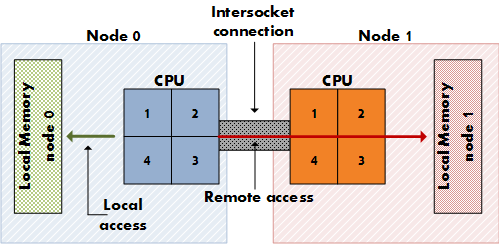
A possible NUMA architecture highlighting local and remote access. Source: Frank Denneman
As you can see from the diagram above, NUMA could be considered a form of cluster computing in that ideally logical cores work together with local memory for improved performance.
Before we proceed, it’s worth noting that there are two forms of NUMA: hardware and software. Software NUMA utilises virtual memory paging and is in most cases an order of magnitude times slower than hardware NUMA. Today, we are looking at the hardware flavour – that is, CPU architectures that have an integrated memory controller and implement a NUMA design.
The “why should I care” part comes when one realises that NUMA should have a direct impact on deciding:
- How much memory to install in a server (an up-front decision) and,
- How much memory to allocate to each VM (an on-going consideration), assuming you are planning to virtualise.
In fact, Microsoft has gone so far as to say that “During the testing, no change had a greater impact on performance than modifying the amount of RAM allocated to an individual Hyper-V image“. That was enough to make me sit up and pay attention. If you are one for metrics, Microsoft estimate that performance drops by around 8% when a VM memory allocation is larger than the NUMA boundary. This means that you could end up in a situation where assigning more RAM to a VM reduces performance due to the guest session crossing one or more NUMA node boundaries.
The current Microsoft guidance
We’ve looked at the theory and hopefully it’s clear that we need to determine our NUMA node boundaries when architecting a virtualised SharePoint solution. Microsoft provides the following guidance to help calculate this:
“In most cases you can determine your NUMA node boundaries by dividing the amount of physical RAM by the number of logical processors (cores). It is recommended that you read the following articles:
- Hyper-V Performance Counters – Part five of many – “Hyper-V VM Vid Numa Node”
- Looking for that last ounce of performance? Then try affinitizing your virtual machines (VM) to a NUMA node“
Let’s take a look at the bold text above which represents the “rule of thumb” calculation that is most commonly referred to when discussing NUMA nodes. Michael Noel (very well known in the SharePoint space) uses this calculation in most of his virtualisation sessions, a good example being available here:
“A dual quad-core host (2 * 4 = 8 cores) with 64GB RAM on the host would mean NUMA boundary is 64/8 or 8GB. In this example, allocating more than 8GB to a single guest session would result in performance drops”.
At first glance the [RAM/logical cores] calculation provided by Microsoft might seem compelling due to its simplicity. I would guess that the formula was tested and found to be a reliable means of determining NUMA node boundaries (or at least performance boundaries for virtual guest sessions) at the time of publication.
However, as you will see later I haven’t found a shred of evidence to suggest that this guidance actually provides NUMA node boundaries for modern (read: more than 4 logical cores) processors. That’s not to say that it’s bad advice: in a “worst case” scenario (i.e. the guidance doesn’t work for larger CPUs); the outcome would be that those that have followed it to the letter will be left with oversized servers (with room for growth). In a “best case” scenario I am completely off the mark with this post and everyone (including me) can rest assured that our servers are sized correctly. It’s a win-win.
Applying the current NUMA node guidance in practice
As diligent SharePoint practitioners we always aim to apply the best practice guidance provided by Microsoft and the NUMA node recommendation should in theory be no exception. In order to provide an example we need to consider any related advice, such as Microsoft’s guidance on processor load:
“The ratio of virtual processors to logical processors is one of the determining elements in measuring processor load.When the ratio of virtual processors to logical processors is not 1:1, the CPU is said to be oversubscribed, which has a negative effect on performance.”
While we’re discussing processor sizing, let’s not forget that Microsoft list 4 cores as a minimum requirement for Web and Application servers. We now have two potentially conflicting guidelines:
- For large NUMA boundaries we need to either install a large amount of physical memory (an acceptable if potentially expensive option) or keep the number of logical cores down.
- To consolidate our servers we need to ensure that there are enough logical cores to allow for a good virtual: logical processor ratio.
Let’s apply those guidelines to a relatively straightforward consolidation scenario in which we want to migrate two physical servers to one virtual host. Let’s assume that each server has 16GB of RAM and a quad core processor at present. Allowing some overhead for the host server, I think we would be quite safe with 10 logical cores and say 36GB of RAM… except we can’t buy 5-core processors. We will have to settle with two hex-core processors, giving a total of 12 logical cores.
So what would our NUMA boundary be in that scenario?
36GB / 12 cores = 3 GB RAM.
That doesn’t sound right. If each guest session is allocated 16GB RAM we would be crossing 6 NUMA boundaries! From what we’ve gathered so far, performance would rival that of a snail race.
Let’s instead flip the formula on its head and work out how much RAM we need to allocate to ensure that we don’t cross a NUMA boundary. 16GB NUMA node * 12 CPU cores = 192 GB RAM. That doesn’t sound right either given that we were simply trying to consolidate two VMs. Our options appear limited to buying a shed load of memory or reducing the amount of memory allocated to each guest session. The downsizing option would probably mean we need an additional server or two meaning we would be scaling “down and out”. A larger number of “thin” servers can potentially perform better than a smaller number of “thick” servers so this isn’t necessarily a bad idea (although your license fees will go up!J).
At this stage it seems that the frequently cited NUMA requirements are very restrictive and limit us to either oversizing servers or changing our planned topology. In light of what we know so far about NUMA and our brief discussion above I think the question that we are all asking ourselves is: does the NUMA boundary guidance still apply for modern CPUs?
A deeper dig
In an attempt to provide evidence to help answer our question I decided to do a little research around NUMA and took a peek under the hood using metrics obtained from appropriate tooling (we’ll be using CoreInfo and Hyper-V PerfMon stats).
Given that NUMA is a memory design that is relevant to CPUs, I figured that a good place to start would be two big players in this space: AMD and Intel. Presumably if they are manufacturing chips that implement NUMA they provide some guidelines around performance. I grabbed the following resources straight “from the horse’s mouth”:
Performance Analysis Guide for Intel® Core™ i7 Processor and Intel® Xeon™ 5500 processor
NUMA aware heap memory manager
A supporting statement (although not authoritative in the same way that statements regarding CPUs from Intel or AMD are) from a MSFT employee reads as follows:
“Today the unit of a NUMA node is usually one processor or socket. Means in most of the cases there is a 1:1 relationship between a NUMA node and a socket/processor. Exception is AMDs current 12-core processor which represents 2 NUMA nodes due to the processor’s internal architecture.”
So far we have found evidence to suggest that in general, the CPU socket (not logical core) represents the NUMA node boundary in modern processors. To reinforce our findings, let’s see what CoreInfo and PerfMon have to say on the matter.
For reference the server in this example is a HP DL 380 G7 with 64GB RAM and two hex core Xeon E5649s (which implement NUMA). The CPUs have hyper threading enabled. The OS is Windows Server Core Enterprise 2008 R2 SP1.
|
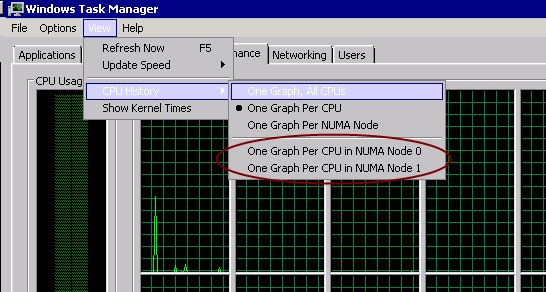
EDIT 15/11/2011: Thanks to Brian Lalancette for pointing out that NUMA nodes are also exposed within Windows Task Manager – see the screenshot below. This is probably the quickest way of determining how many nodes you have assuming the feature is accurate.
Note that if you don’t see the “CPU History” option in Task Manager, it’s likely that your CPU does not implement a NUMA design. Use CoreInfo to check!
|
|---|
Hex core HP server with Intel E5649s: Task Manager
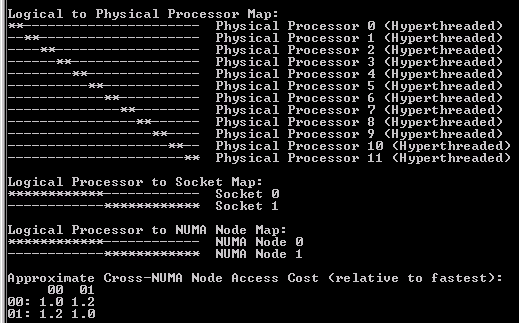
Hex core HP server with Intel E5649s: CoreInfo
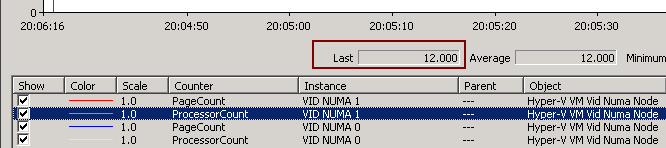
Hex core HP server with Intel E5649s: PerfMon (ProcessorCount)
Hex core HP server with Intel E5649s: PerfMon (PageCount)
There are a few points of interest in the screenshots above:
- CoreInfo tells us that cross-NUMA (remote) node access cost is approximately 1.2 relative to fastest (local) access.
- Hyper threading means that 24 logical cores are displayed in both CoreInfo and PerfMon.
- PerfMon indicates that 12 processors are associated with each NUMA node.
- Only two NUMA nodes show in both CoreInfo and PerfMon.
- Each NUMA node contains 8,388,608 4K pages or 32 GB RAM.
- The formula provided by Microsoft doesn’t work in this case assuming CoreInfo and PerfMon are correct (the MS guidance would indicate there are 12 NUMA boundaries of approximately 5.3 GB each).
- In this particular case, there is a 1:1 ratio between CPU sockets and NUMA nodes, meaning that there are 2 NUMA nodes of 32 GB each.
Ask the expert
With some initial analysis in hand (but without any supporting data around performance) I thought it worth sharing with an industry expert – Michael Noel. Michael was kind enough to respond very promptly with this insight:
“As it looks, the chip manufacturers themselves changed the NUMA allocation in some of these larger core processors. When we originally did this analysis, the common multi-core processors were dual core or at most quad core. On these chips, the hardware manufacturers divided the NUMA boundaries into cores, rather than sockets. But it appears that that configuration is not the same for the larger multi-core (6, 12, etc.) chips. That’s actually a good thing; it means that we have more design flexibility, though I still would recommend larger memory sizes…
CoreInfo is likely the best tool for this as well, agreed on your approach.“
Conclusions
Viewing this data on one physical server isn’t exactly conclusive. I do think that it raises questions around whether or not Microsoft’s prescriptive guidance is causing a little confusion when it comes to virtual host and guest sizing. Without additional data my suggestion at this stage would be to adjust the guidance to take more of an “it depends” stance rather than providing a magic number. Hopefully the vendors will release some performance stats related to NUMA and virtualisation for modern (larger) CPUs that will help guide future hardware purchasing decisions.
To be fair to MS, they do provide this pearl of wisdom: “Because memory configuration is hardware-specific, you need to test and optimize memory configuration for the hardware you use for Hyper-V.” While that should technically let them off the hook, I for one would prefer that the rule of thumb be removed if it starts to become less relevant for modern hardware.
In short, don’t assume that your NUMA boundaries are divided into cores – it very much depends on your specific CPU architecture. My advice would be to check using tools such as CoreInfo and performance monitor or ask your hardware vendor in advance.