
Whilst reviewing the content for exam 70-667 (TS: Microsoft SharePoint 2010, Configuring) this evening, I came across a SharePoint 2010 topic that I haven’t previously covered in any great detail: Content Deployment. Given that I wanted to recap the topic in advance of the exam anyway, I thought I would blog it in case anyone else in the SharePoint community is hoping to learn a little more about it. Note that content deployment is not new for SharePoint 2010 – it was present in MOSS, but I will be focussing on the 2010 implementation today.
In simple terms, content deployment is the authoring of content in one site collection that will be deployed to another site collection. A typical scenario for this feature is an Internet facing Web site that requires content authors to deploy to a staging environment prior to go-live. In these types of environments it is not uncommon to have one or more mandatory approval processes before content can be pushed to a public facing site – think corporate sites littered with legal jargon for example. Staging environments in this context can range from the use of a separate site collection in an “authoring” Web application (within the same SharePoint farm) to multiple pre-production farms in which content must be approved.
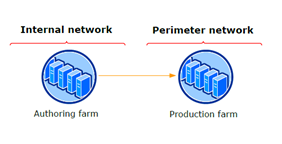
Typical two farm topology for Internet facing authoring scenarios.
You may be thinking that having an authoring farm may be a little overkill in some cases – and you would be right. Content deployment in SharePoint 2010 is not for everyone and typically covers scenarios where either security is a problem (i.e. authors should not be granted access to the production environment), or there are technical reasons for using a separate authoring farm (e.g. authors are publishing to an internal farm and external content is hosted on a farm with a completely different topology). Microsoft provide a good overview of Content Deployment in this PDFwhich gives further details. In many cases, organisations implementing a small or medium SharePoint 2010 farm may find that using publishing workflows within their production site collections to implement their content approval processes is sufficient.
For those that do decide that content deployment is appropriate for their environment, there are numerous considerations that you will need to note down. These include (amongst others):
- The source and destination site collections must be in separate content databases. Given the typical usage scenario for content deployment this should not normally pose a problem but is one to bear in mind if simply experimenting on a VM.
- The initial content deployment destination must be a blank site collection. You create a site collection and opt to select a template later on – do not create a site collection with a “blank template” as this is not classed as an empty site collection.
- Content deployment is one way. There is no way of synchronising authoring and production environments, although typical usage scenarios deem this inappropriate anyway.
- Import and export servers must both host an instance of the Central Administration Web site.
Without further ado, the steps for setting up a very basic content deployment job for test purposes are below.
Test environment:
- One SharePoint 2010 farm.
- Two Web applications: one for “authoring”, one “production”.
- One site collection at the root of the “authoring” Web application, created using the OOB “team site” template.
Steps to configure content deployment:
1. Create a blank site collection in the “production” Web application.
During this stage, ensure that you select “<Select template later>”. Do not create a site collection using the “Blank Site” template, as this does not count as an empty site collection and content deployment will fail.
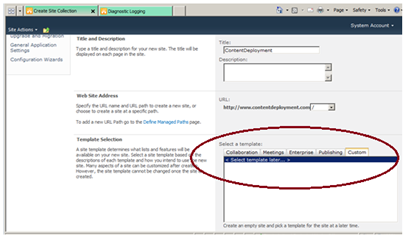
The initial content deployment job must be to an empty site collection – opt to select a template later.
2. Configure content deployment in Central Administration
Navigate to Central Administration > General Application Settings > Content Deployment > Configure Content Deployment. Opt to accept incoming Content Deployment jobs (allows content deployment jobs to be received from other farms) and for this test scenario we will choose not to require an encrypted connection for simplicity.
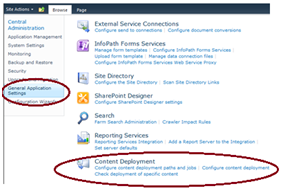
The Content Deployment section is located within “General Application Settings”.
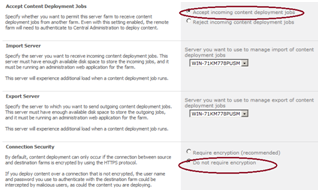
Accept incoming content deployment jobs and remove the encryption requirement (test scenarios only).
3. Configure new deployment path
A content deployment path is required to define a one-one relationship between a source and destination site collection for the purposes of content deployment. Once you have created a path, jobs can be scheduled and run on an ad-hoc basis to deploy content as required. Select your “authoring” Web application (i.e. the one with content) as the source and your “production” (empty) site collection as the destination. For the purposes of this test, simply enter the current central administration address, including the port number. Note that the name is simply for your own reference (I suspect given that this is SharePoint there is a GUID behind the scenes).
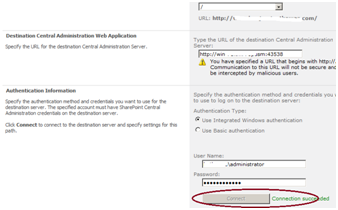
You will need to test your connection in order to populate the destination site collection list.
4. Create deployment job and run
Finally, you will need to create a deployment job. Jobs and deployment paths have a one-one relationship so you will need to create at least one job for each path you have specified. Select the “One time only” radio button to kick the job off immediately.
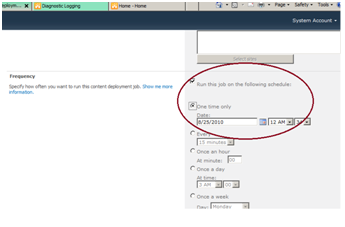
Create a schedule, or run the job now using the “One time only” option to test your new deployment path.
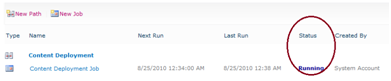
You can view current job status on the “ Manage Content Deployment Paths and Jobs” page.
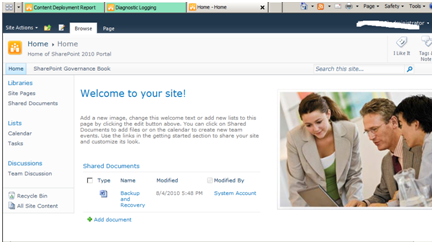
“Production” site collection with deployed content.
Summary
Although not appropriate for all environments (small environments may be able to make use of OOB workflows in a single production site collection), Content Deployment in SharePoint 2010 is a flexible solution that allows multi-step business approval processes for authored content to be implemented effectively. The solution can scale from a basic deployment path between two Web applications in one farm (as shown here) to a multiple farm authoring process appropriate for large scale validation and testing of custom content.